On-screen questions
Point MiPrep at a coding-exercise window and it reads the problem itself.
Some questions are never spoken. A coding exercise appears in a browser tab or a platform's editor, and the interviewer says nothing more than "take a look".
MiPrep can watch one window and answer what is written in it.
Two very different screens
The first thing MiPrep decides is what kind of screen it is looking at, because a LeetCode page and a take-home repository need opposite behaviour. It makes that call once, on the first frame it reads.
| What it sees | What it does |
|---|---|
| A single-page exercise — CoderPad, LeetCode, HackerRank: a problem statement and one editor, no file tree | Answers immediately. There is nothing else to look at. |
| A workspace — a file tree, several files, tests, a README | Reads first, answers second. See below. |
| An empty editor | Says nothing about the screen. If the interviewer typed nothing, the question was spoken, and describing an empty editor back at you is noise. |
| A slide or document | Reads it. No file tree, so nothing to explore. |
If it names the wrong kind, the per-answer buttons below are how you correct it without restarting anything.
A workspace is read before it is answered
Given a repository, answering off the first screenshot means answering off whichever file happened to be open. So MiPrep does what a candidate does: it looks around first.
It lists what it can see, then works through the files one at a time, asking you to open or scroll each one. Each step it tells you what it is looking at and what it still has not seen. When it has enough, it writes the answer once.
It cannot open or scroll anything itself. Every step is a request to you, and that is not a limitation to work around — a tool that drove your editor during an interview would be doing something very different from reading a screen you are already showing.
Pick a window
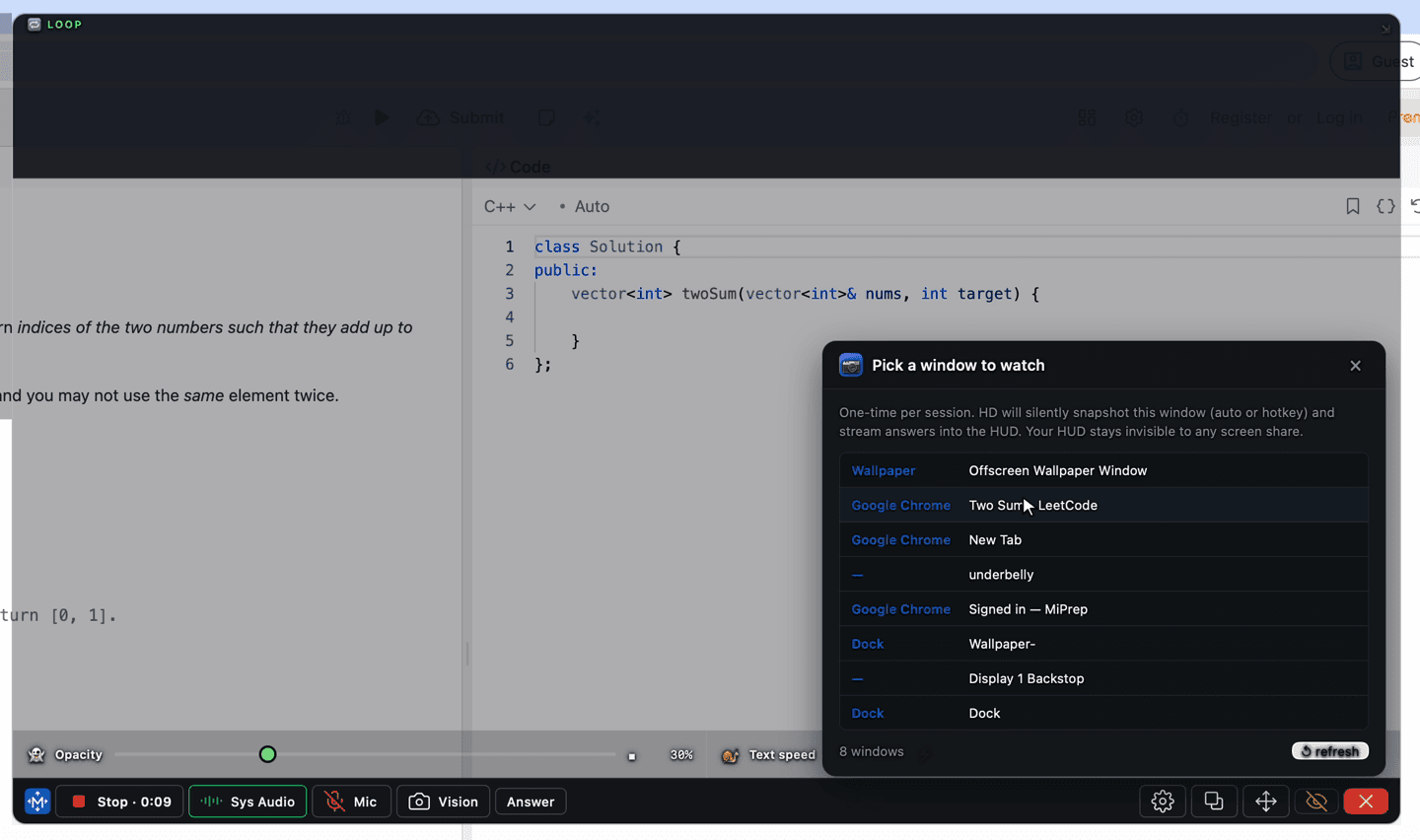
Choose the window holding the exercise. MiPrep watches only that window — not your desktop, not your other tabs.
Once picked, it checks that window every five seconds and answers when the content actually changes. A new question gets a new answer; a blinking cursor or a ticking timer does not.
How it decides the screen changed
This is worth understanding, because it is the difference between an answer arriving and nothing happening at all.
Every five seconds MiPrep takes a frame and reduces it to a 64-bit perceptual hash — a fingerprint of the layout and tone of the image rather than its pixels. That fingerprint is compared against the last frame it actually sent, not the last one it looked at.
| Difference from the last sent frame | What happens |
|---|---|
| 0 bits — genuinely identical | Never sent. A static screen is never re-read. |
| Under 10 bits — small change | Skipped… but see the twenty-second rule below. |
| 10 bits or more — real change | Sent, and answered. |
The twenty-second rule, and why it exists
A perceptual hash is dominated by layout, and coding platforms deliberately keep one layout for every problem — same chrome, same two-pane split, same editor box. Only the prose swaps.
So moving from question 1 to question 2 can move fewer than ten bits, and early on that meant the first question of a set was answered and every one after it was silently dropped as "unchanged". That is precisely the situation the feature exists for.
Lowering the threshold does not fix it: low enough to catch a paragraph swap is low enough that a blinking cursor triggers a resend. So the threshold stayed and a staleness floor was added underneath it — a frame whose difference is non-zero but below the threshold is sent anyway once twenty seconds have passed since the last send.
Zero-difference frames are still never sent. A screen you are not touching costs nothing.
Capture now
Press ⌘⇧V/Ctrl+Shift+V to read the window immediately instead of waiting for the next check. It skips the five-second timer and the change detection entirely, so it works even on a screen MiPrep has already decided is unchanged.
Use it the moment a new problem appears rather than waiting to find out whether the automatic pass will catch it.
The three buttons on every answer
A read loop that only you can advance needs controls, and they sit on the answer, not on the toolbar. Each one acts on the frame that answer came from — not on whatever is on screen by the time you have finished reading.
| Button | What it does |
|---|---|
| Harder | Re-answers the same screen with a stronger model. For when the answer is too surface-level for the problem. |
| Done with this file | "I have already read this one." Marks that file read and takes a fresh look at the screen, so the next instruction is computed against what is in front of you now. |
| Answer now | Stop exploring and write the solution, naming whatever it did not get to. |
Which one to press
You do not need to think about the loop. Four situations, four buttons:
| What you are thinking | Press |
|---|---|
| "It has already seen this file — I read it two steps ago." | Done with this file |
| "It has been through everything but still has not given me the answer." | Answer now |
| "That answer is too thin for this problem." | Harder |
| "It is looking at an old screen — I have scrolled since." | Capture now, on the toolbar |
That placement is the whole design. A control that acts on "the last frame" is already wrong by the time you have read an answer and decided it needs something — you have scrolled since. Anchored to the answer, it acts on the screen that produced it.
If a button cannot do what you asked — the session is not running, the frame has aged out — it says so in words and re-enables itself. A control that greys out after a refusal is claiming something happened.
What it cannot see
- Exclusive-fullscreen games and some DirectX applications come back blank.
- DRM-protected video comes back blank.
Neither matters for an interview, but if a window renders black in the picker, that is why.