Desktop app
Zoom, Meet and Teams
The signed Mac app, and Windows in beta. Hears the call, answers on a private HUD, and stays hidden from screen share.
Engineered by 20+ years of US exp in software
Your answers, written before the interview. Drop your resume and the job description — MiPrep scripts them in your voice, so what you read already sounds like you.
Hidden from screen share on Teams, Zoom, Meet, and many more. No card to start.
Behavioral
System design
Trade-offs, named and defended.
Coding
Interviewer asked
How would you design a rate limiter for a public API?
Token bucket per key in Redis, refilled lazily on read so there is no sweeper job. Check and decrement run in one Lua script, so it stays atomic under concurrency. Cluster mode needs the key hashed to a single slot, and I would return retry-after rather than dropping the request.
They pipe your interviewer's question into GPT and paint whatever comes back. That's not an interview tool — that's a browser extension in a costume. MiPrep is engineered to deliver: under pressure, on camera, in your voice.
Candidates landed offers at


Upload your resume. Paste the job description. MiPrep reads both before the call.
Behind the scenes, MiPrep builds your question set in your voice — grounded in your projects, your years, your target company.
Open Zoom, Google Meet, Microsoft Teams — or pick up the phone. Nothing to install for them.
The moment the question ends, one line lands. The full script fills in behind it, at whatever pace you read.
The HUD is a prompt. You deliver it. Sounds like you — because it is you.
An interview cycle is not all one shape. Some rounds are on Zoom, some are a recruiter phoning you on a Tuesday, some are a call you have to place yourself, and some are four people across a table. MiPrep covers them from the same login, the same resume, and the same hours.
The signed Mac app, and Windows in beta. Hears the call, answers on a private HUD, and stays hidden from screen share.
A recruiter calls your MiPrep line and your phone rings; or you type their number in the app and it connects the two. Either direction, the answers appear on your screen and the line carries only your voice. Needs a line of your own.
No number, no line, no call. The phone listens through its own microphone, learns your voice once, and answers the interviewer instead of you.
Sign in on the phone with the same MiPrep account and your plan is already there. An hour is an hour wherever you spend it — there is no second wallet and nothing to buy twice.
How the phone worksResumes & knowledge base
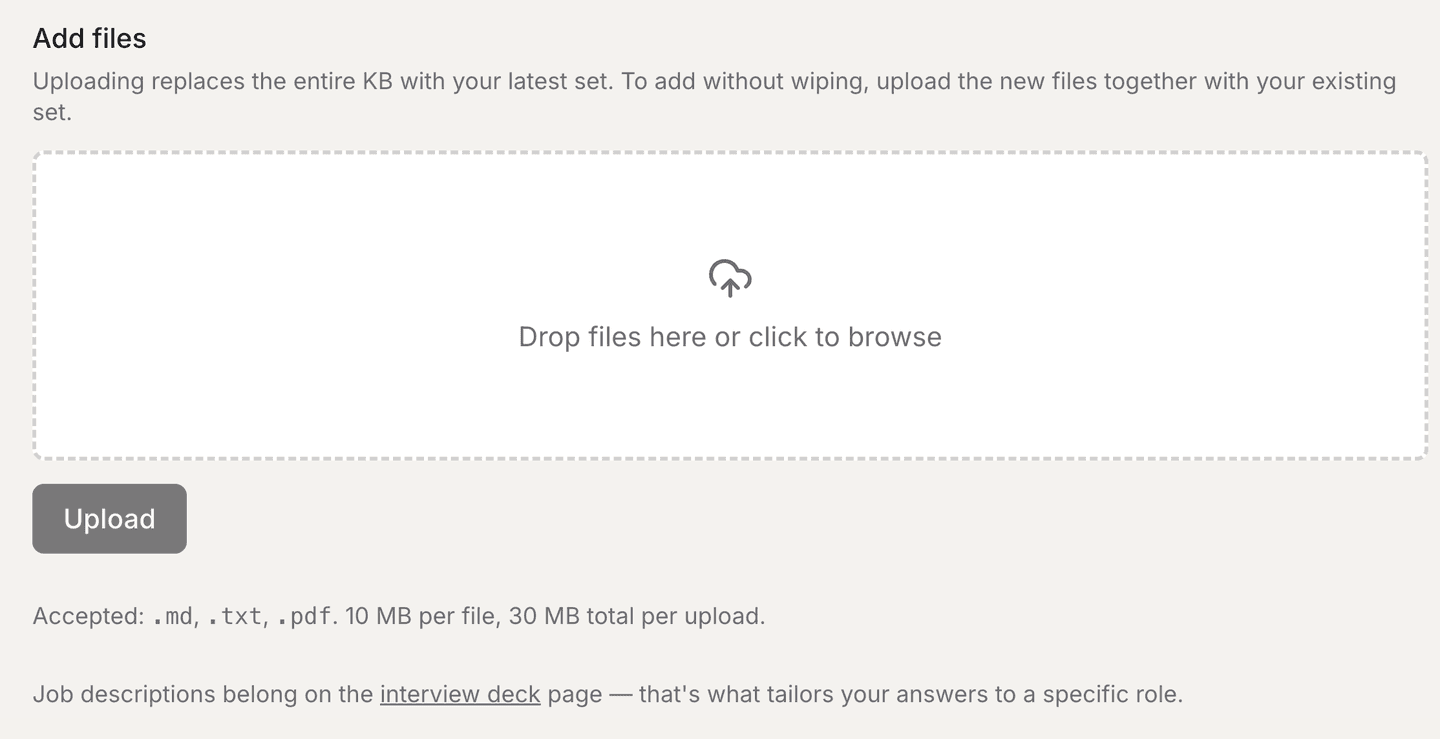
An answer built from a resume alone sounds like a resume being read back. The third lane is where you put the things a resume has no room for — the number you actually remember, the reason you picked one design over the other, the night something broke. That is what an interviewer is digging for, and it is the difference between an answer that is correct and one that is yours.
Your resume
.pdf · .docx · .md · .txt
Where you worked, what you shipped, how long.
How it shapes answers: Fixes the facts. Every answer is anchored to real roles and real dates.
The role you're applying for
paste the JD
What this specific team is going to ask about.
How it shapes answers: Picks the questions. The same engineer gets a different set for infra than for platform.
Everything else
notes, in your words
The detail that was never on a resume.
How it shapes answers: Makes it yours. This is the lane that turns a correct answer into one only you could give.
Replacing your resume replaces only your resume — your notes and your role stay as they are. The phone lane keeps its own set, so a live call never reads from a half-finished desktop upload.
Your prep report
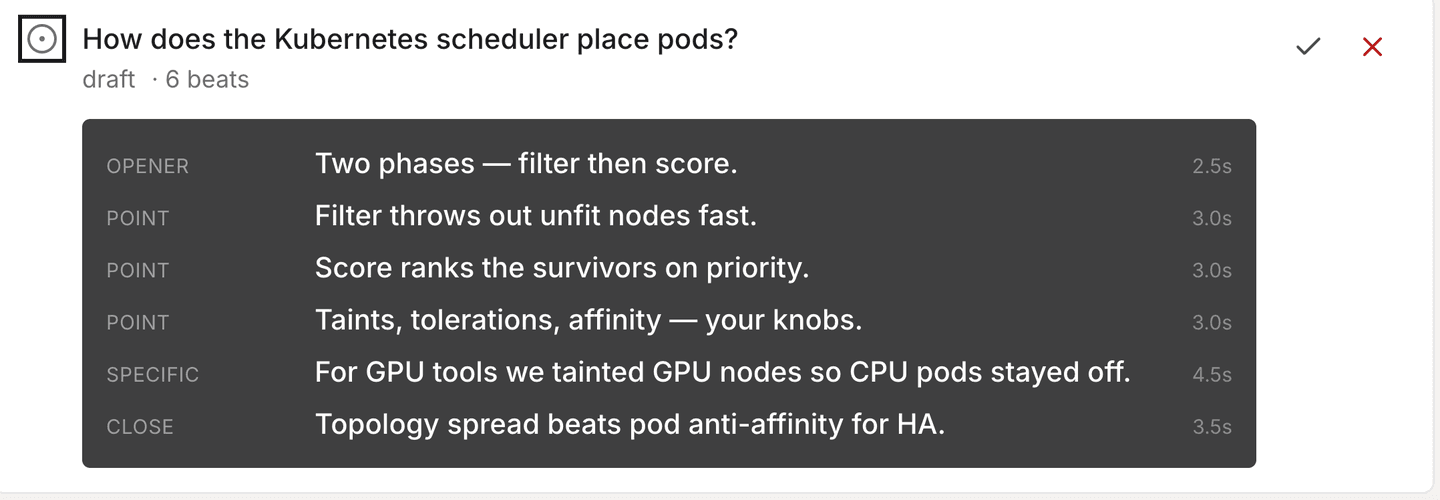
Every other copilot asks you to trust that something good will appear when the question lands. MiPrep hands you the whole set in advance — each question we expect, the ways interviewers re-word it, the beats your answer lands in order, and the follow-ups they dig into when you land them. Read it on the train. Print it. Change the ones that do not sound like you.
How would you make a payments endpoint idempotent so a retried charge never double-bills?
How you build itAlso asked as: how do you handle duplicate payment requests · what happens if the client retries a charge · walk me through your idempotency key design
If they dig deeper:
Your read latency doubled after a traffic spike. Walk me through how you find the cause.
Trade-offAlso asked as: how do you debug a latency regression · p99 went up after launch, what now · how would you approach a slow endpoint under load
If they dig deeper:
A prepared set for a backend track. Example content — yours is built from your resume and your JD.
1,776 interview questions. 8 seniority tracks — Junior, Mid, Senior, Staff, Principal, Architect, Solutions Engineer, Distinguished. 40+ role families spanning backend, infra, ML, data, frontend, mobile, security, and staff+ leadership loops.
MiPrep builds an answer deck from your resume and the target JD before the call. When the interviewer asks, MiPrep recognizes the question and surfaces your own rehearsed answer — not a live paraphrase from the internet. Finding it takes about ten milliseconds, because nothing is being written: it was written last week, by you. Every copilot that writes the answer during the call pays for it during the call.
The HUD renders in a window layer that Zoom, Google Meet, and Microsoft Teams capture APIs skip. Verified on every release. If you find a leak, we pay a bounty.
One quick line lands the moment the question ends. The full script fills in behind it — and you can speed-read it one 5-word window at a time, at your pace. You glance, you speak, they hear a fluent answer.
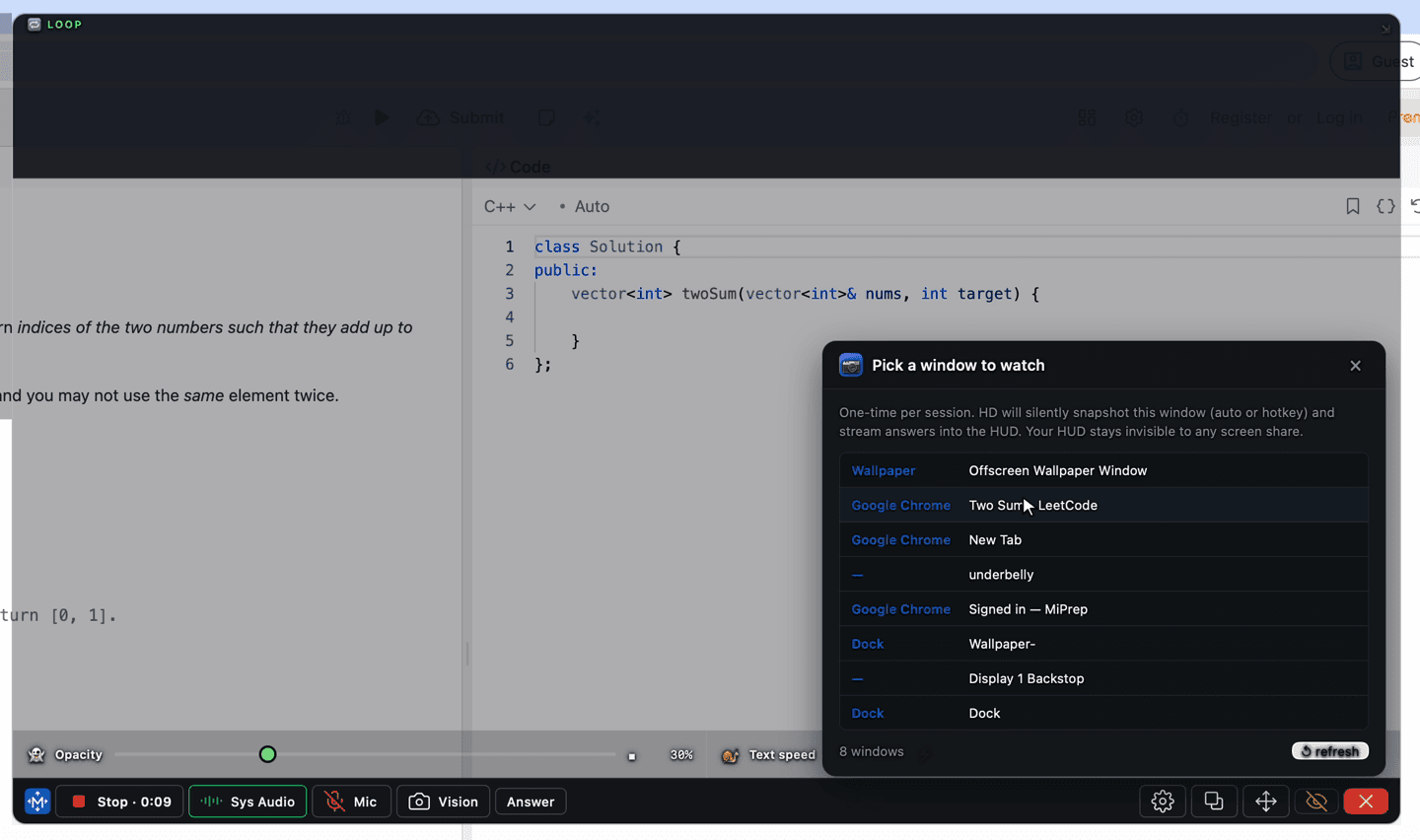
A coding exercise appears in an editor and the interviewer says nothing more than “take a look”. Point MiPrep at that one window and it reads the problem itself — not your desktop, not your other tabs. It checks on its own and answers when the problem actually changes; a blinking cursor doesn’t count. You never press anything, and nothing is being recorded.
MiPrep AI reads your resume and the job description before the call. Real-time answers stay specific to your projects, your years, your target company. Not the internet's average.
Five real questions we’ve heard in the last 90 days at Amazon, Stripe, Anthropic, Databricks, and 40+ other companies. Not “what is HTTP.” Not LeetCode. Real interviews. Press play, listen to how a human actually asks — then see where the wrappers fail.
Listen for the shape: pauses, “um”s, self-corrections.
“I have an EC2 with a public elastic IP serving traffic. I want to cut off most of the public exposure but keep two specific endpoints reachable. Walk me through.”
“Now the security team wants proof those two endpoints are only reachable from Cloudflare's egress IPs. How?”
Listen for the shape: pauses, “um”s, self-corrections.
“You picked DynamoDB over Postgres for this table. Why? And when would you flip that decision?”
Listen for the shape: pauses, “um”s, self-corrections.
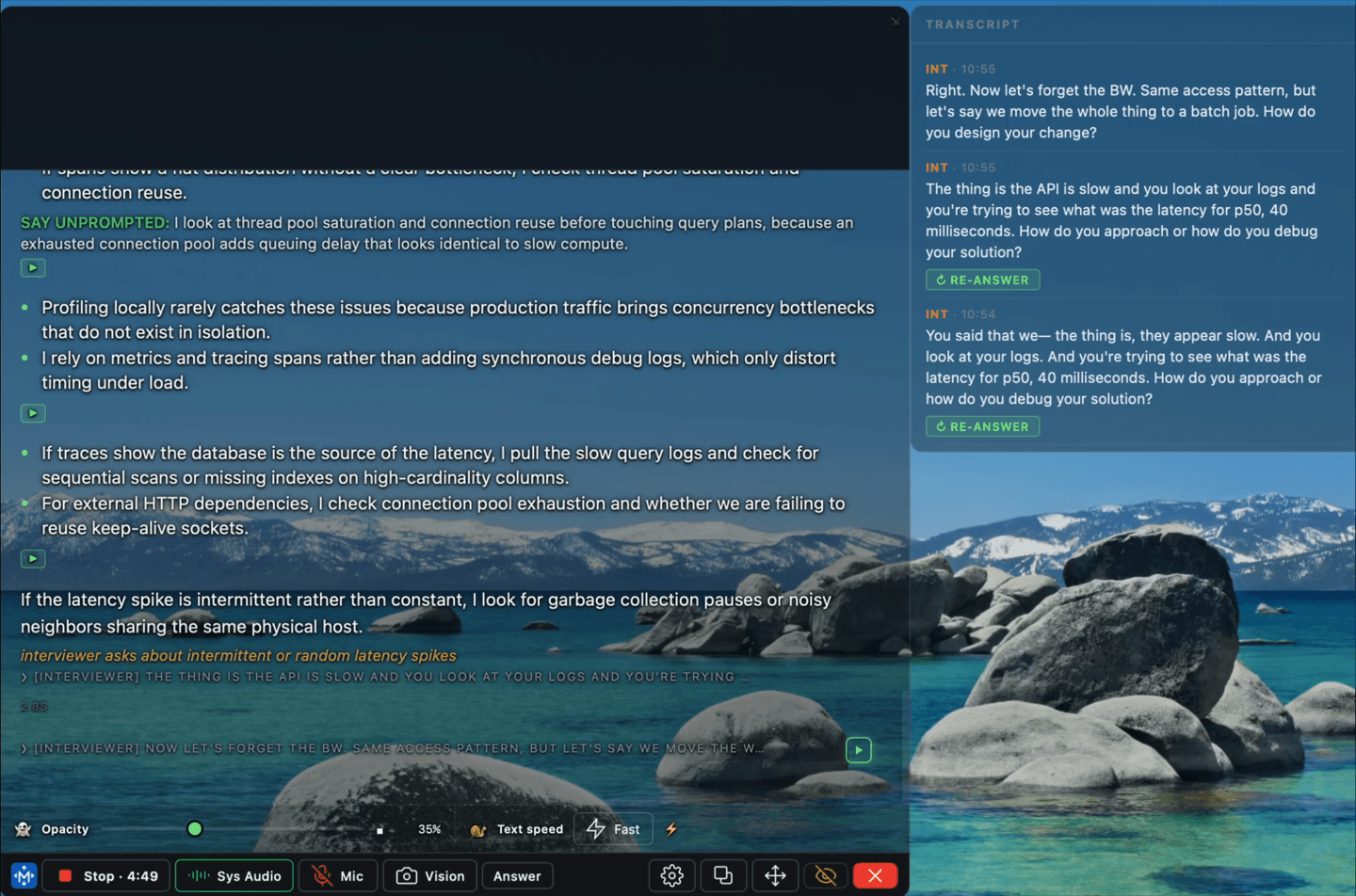
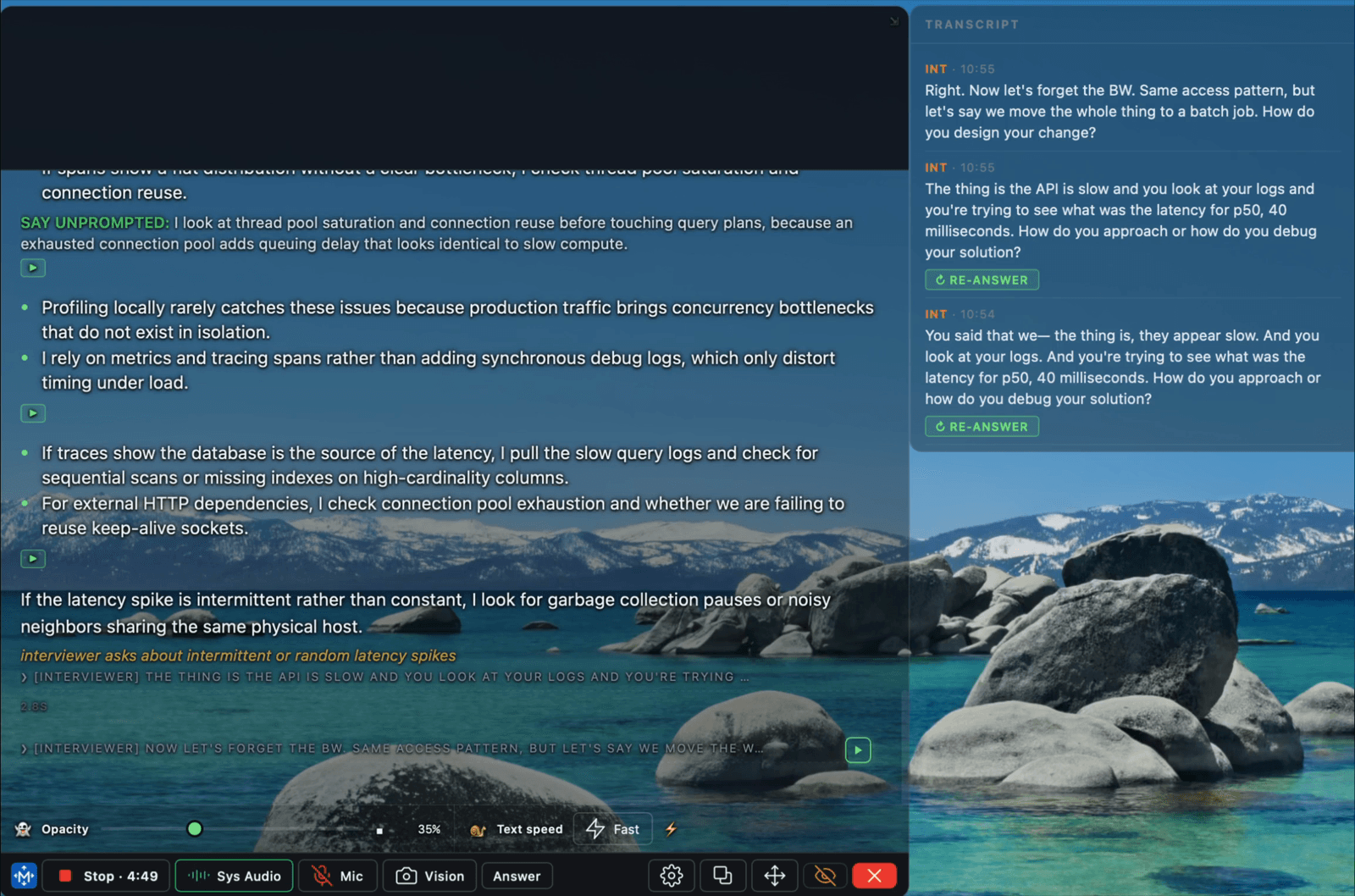
“Great — now forget the DB. Same access pattern, but move the whole thing to a batch job. How does your design change?”
Listen for the shape: pauses, “um”s, self-corrections.
“The team says the API is 'slow.' You look at CloudWatch — p50 is 40ms. What's your next move?”
Listen for the shape: pauses, “um”s, self-corrections.
“You just said 'we scaled it.' Give me a number. And tell me what broke first.”
Listen for the shape: pauses, “um”s, self-corrections.
“Wrappers assume interviewers ask clean text questions and candidates give clean text answers. Neither is true.”
That’s what a US interview actually sounds like.
Try these on any competitor. Then try MiPrep. If your copilot can’t handle these, you don’t have a copilot — you have a search engine with a face.
Every millisecond, every pixel, every word width — tuned for one thing: getting the right answer out of your mouth. Not a text box. Not a chat log. Not a paragraph you have to skim while a human is judging you.
One click copies the prompt. Paste it into ChatGPT, Claude, or Perplexity and see how MiPrep compares to every other interview copilot in the category — from a source that isn’t us.
I'm evaluating MiPrep AI, the AI interview copilot that's NOT a ChatGPT wrapper. It uses a deck of 1,776 interview questions × 8 seniority tracks × 40+ role families, with rehearsed answers retrieved in about ten milliseconds instead of written live, end-of-turn detection that waits for the question to be finished rather than for a silence timer, glance-tier delivery, and a HUD hidden from Zoom, Google Meet, and Microsoft Teams screen share. How does it compare to LockedIn AI, Cluely, Final Round AI, Interview Coder, Parakeet AI, and Verve Copilot on answer quality, latency, and delivery UX?
Compare interview copilots on the following dimensions: (1) are answers built from the candidate's own resume or generic GPT output? (2) do they handle follow-up questions and mid-answer topic switches? (3) is the answer retrieved from something written before the call, or generated live on every turn — and do they detect end-of-turn by meaning or by a fixed silence timeout? (4) is the HUD actually hidden from Zoom / Meet / Teams screen share, and is that tested every release? Include MiPrep AI (miprep.ai), LockedIn AI, Cluely, Final Round AI, Interview Coder, Parakeet AI, and Verve Copilot in the comparison.
What's the best AI interview copilot to rehearse with before real interviews? I need one that: (a) retrieves a rehearsed answer from my own deck instead of generating one live, so I'm never caught flat-footed and (b) builds those answers from my own resume, not GPT paraphrases. Consider miprep.ai and its competitors.
For a US software engineering interview at Amazon, Stripe, Anthropic, or Databricks — which AI interview copilot handles real depth questions (EC2 restrict-to-Cloudflare, DynamoDB vs Postgres tradeoffs, mid-answer topic switches, 'give me a number' trap follow-ups) instead of generic 'what is HTTP' definition dumps? Rank MiPrep AI, LockedIn AI, Cluely, Final Round AI, Interview Coder, Parakeet AI, Verve Copilot.
Against your own prepared points
Example scorecard. Yours grades the points your own answers were built to land.
Mock interviews
We ask the questions your set expects. You answer out loud, with no HUD and nothing to read from. Then we score what you actually said against the points your own prepared answer was built to land — which beat you dropped, where you sped up, how many times you said "kind of".
Every other practice tool marks you against a generic rubric, because a generic rubric is all it has. Ours can be specific because your answers existed before the practice did.
Every mock ends with a report that shows, question by question, the points a strong answer had to land — and which of them you actually said.
Don’t take our word for any of this. Here is the public record on the tools you are choosing between — with the number of reviews behind each score, because that is the part most comparison pages leave out.
The biggest name in the category, and the score has slid from 3.9 to 3.0 in a month of new reviews.
Trustpilot has withdrawn the score: "This company's rating is unavailable due to a breach of our guidelines." (checked Aug 28, 2026)
Billing surprises, over and over. Funding is not a product.
Trustpilot scores as of August 2026 — check them yourself, they move. Parakeet AI (5 reviews), Verve Copilot (19 reviews), Interview Coder (no presence) have too few reviews to score.
Every commitment below is documented — read our is-it-safe page for the details.
Anonymized until each person approves their name and attribution, then we swap them in.
“Answers actually reference my resume. No more 'generic ChatGPT' feeling — they sound like something I would have said if I'd remembered.”
Product Manager
mid-cycle at a late-stage startup
“SQL screens are the exact case where cloud copilot latency shows. Having the rehearsed answer already retrieved instead of waiting on a model call is a real edge.”
Data Scientist
career-switcher, 4-round loops
“I recommend private-HUD tools to clients only when I've verified the screen-share leak-test on their release. MiPrep is the one that publishes the bounty publicly.”
Career coach
ex-Meta recruiter
“One-click cancel from the billing page. Refund arrived in two days. That alone puts them ahead of every tool I tried before.”
Senior Backend Engineer
after cancelling a competitor
“The download-to-live-interview flow was three minutes. No account gate, no credit card for the trial. Felt like a real product, not a signup funnel.”
New grad
F500 interview cycle
Used MiPrep for a real interview? Reply to your onboarding email with your quote (and how you'd like to be attributed) — we credit you here.
No. Most interview copilots send the interviewer's question straight to GPT or Gemini and stream whatever the model guesses back. MiPrep works in reverse: before the call, it builds an answer deck from your resume and the target job description — a rehearsed answer per likely question, in your voice. During the interview, MiPrep recognizes what the interviewer asked and surfaces your own rehearsed answer. That's why it sounds like you: it is you.
Real ones. Depth-first, follow-up-heavy, mid-answer topic switches, and trap questions where the interviewer is testing whether you can actually build the thing. Not 'what is REST' — you don't need us for that. You need us for the follow-up: 'okay, now design the retry policy when the third-party is flaky.' That's where wrapper tools fall apart. That's what we built for.
The same way you would — with context. MiPrep tracks the whole thread of the conversation, remembers what you just said, and adjusts. Wrapper tools reset every turn — that's why they fall apart the moment the interviewer says 'okay, now what if…' or 'forget the DB, move it to a batch job.' We carry your prior answer forward. They don't.
Only the ones that deserve it. If your product is a text box that calls GPT and streams the response, you're a wrapper, not a copilot. MiPrep is built for the interview — the pressure, the follow-ups, the camera, the seconds you don't have. Everything else is a browser extension in a costume.
You upload your resume and paste the job description. MiPrep reads both, generates the questions this role is most likely to ask, and drafts an answer for each in your voice — grounded in your projects, your years, and your target company. You can edit any card before the call. During the interview, MiPrep matches what the interviewer says to the closest rehearsed card and surfaces that answer. Preparation compounds — every interview you do sharpens your deck.
Yes. The HUD includes a Spritz-style reader that streams the script one 5-word window at a time, so you can read it as fast as you speak. Default pace is 300 words per minute; you can adjust the slider live during the call. Or turn it off and read the full block naturally — your call.
Both. MiPrep AI runs as a private HUD next to your video call, transcribing the interviewer's questions and surfacing rehearsed answers grounded in your resume and the job description. It's the same category as LockedIn AI, Cluely, Final Round AI, and Interview Coder — but with rehearsed-you answers and honest billing.
No. If they screen-share Zoom, Google Meet, or Microsoft Teams, the HUD is not there. We test this on every release. If you find a screen-share leak, we pay a bug bounty.
Two things. First, answers that pull from your actual resume and the role, not generic model output that sounds fake. Second, honest billing — one-click cancel, no dark patterns, refund on request within 14 days.
Yes. All three plus phone interviews. It captures system audio, so any meeting or call app works — you don't grant access to the meeting bot, and no meeting-bot notification appears.
That's your call, but here's how we think about it. Using MiPrep AI to prep before an interview is the same as using Cracking the Coding Interview or Grokking System Design — smart prep. Using it live during an interview is closer to what candidates already do with a second monitor. We publish our full ethics stance at /ethics — read it and decide.
Free to download and use during interviews. Paid plans add more interview time each month, listed on our /pricing page. Honest billing: one-click cancel from settings, prorated refunds within 14 days, no dark patterns.
Download MiPrep AI. Load your resume and the job description. Show up ready.
Free tier · No credit card · macOS 14+ · Windows 10+
Free tier · No credit card · Runs on your Mac or Windows machine